
EMAIL SUPPORT
dclessons@dclessons.comLOCATION
USZscaler App Connectors
In this chapter, we explore Zscaler’s next key capability: App Connectors, which securely link users to applications through the Zero Trust Exchange.
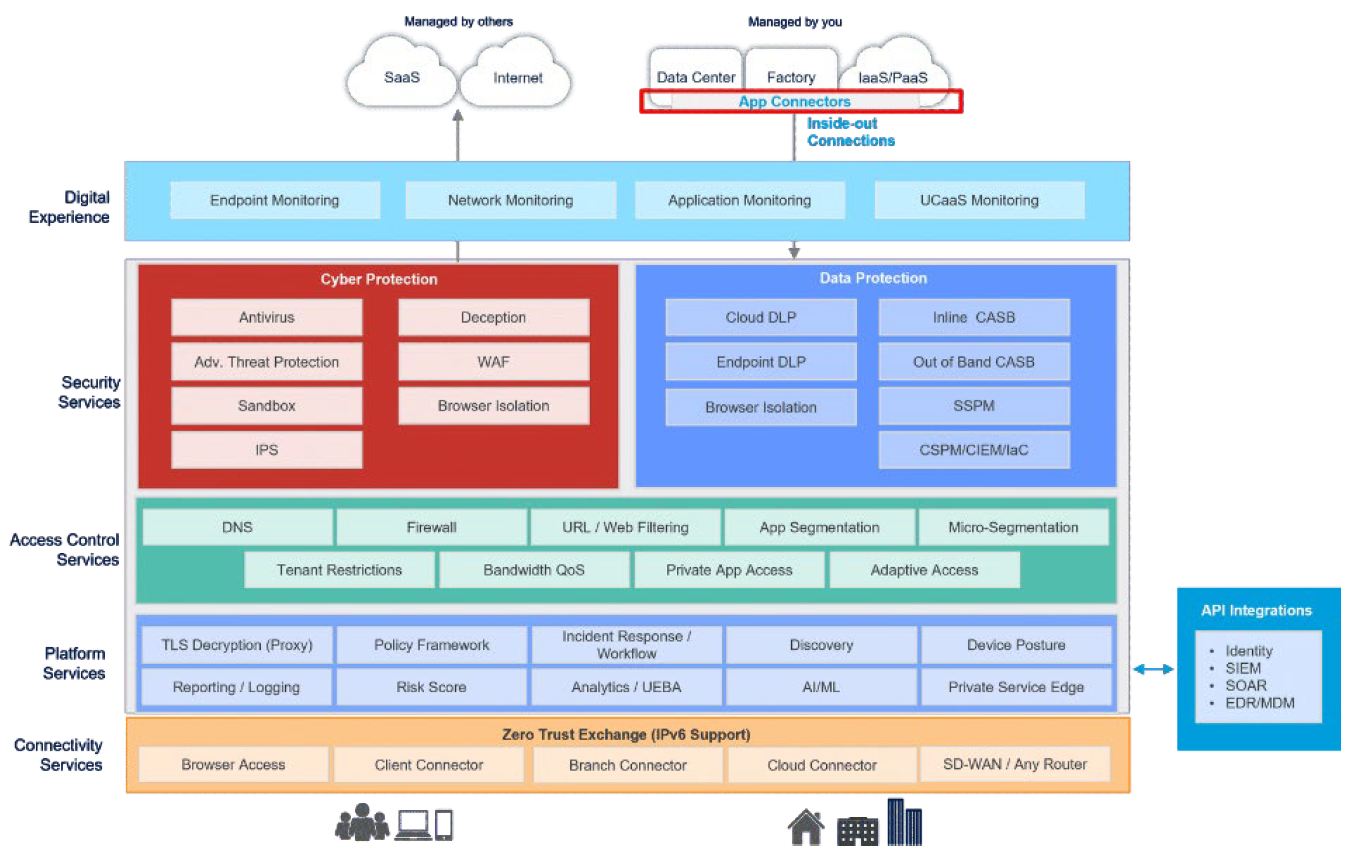
App Profile Overview
App and IP Bypass
- Global Bypasses: Ensures specified traffic is never forwarded to the Client Connector.
- IP Bypasses: Allows the Client Connector to bypass traffic from designated IP ranges.
Disaster Recovery
- Supports ZIA and ZPA disaster recovery scenarios.
- Enables ZPA Business Continuity configurations.
DNS Settings
- Defines how DNS traffic is handled by the Client Connector.
- Allows configuration of DNS domain requests that should be tunneled to ZIA.
Advanced Settings
- Supports environments with no-default-route networks.
- Provides Zscaler firewall controls for inbound traffic.
- Manages ZIA reactivation timing.
Data Protection
- Enables enhanced control for eDLP (Enterprise Data Loss Prevention).
Client Security Controls
- Protects the Client Connector from being disabled using OTP-based security.
- Offers authentication settings for ZPA Machine Tunnels and re-authentication policies.
Notifications & Logging
- Customizable user notification and logging configuration options.
Tamper Protection & Version Management
- Anti-tampering safeguards.
- Supports Client version rollback (Revert) when needed.
An application profile is used to map forwarding profiles to different users and devices based on defined criteria. This means a dedicated application profile must be configured for each device type—Windows, macOS, iOS, Android, and Linux. In this chapter, we’ll focus specifically on Windows and macOS.
The application profile determines which forwarding profile is selected, and therefore defines the tunneling method. For example, if the forwarding profile specifies Z-Tunnel 2.0, the application profile ensures that user traffic is forwarded through this tunnel.
The profile also defines on-trusted and off-trusted network behavior and indicates that the system proxy should not be configured.
The PAC URL within the app profile determines the appropriate Zero Trust Exchange node based on the client’s geographic IP. You will configure the PAC file later in the Zscaler Internet Access (ZIA) Admin Portal, which decides which traffic should be forwarded to or bypassed from the Zero Trust Exchange.
Override WPAD ensures that system-level GPO WPAD settings do not interfere, giving precedence to the WPAD configuration set in the forwarding profile.
On Windows devices, Restart WinHTTP forces the system to refresh all proxy settings when the Zscaler Client Connector becomes active.
Tunnel Internal Client Connector Traffic ensures that health checks and policy communications stay within Zero Trust tunnels instead of going directly to the Zero Trust Exchange.
Cache System Proxy preserves the system’s existing proxy configuration before the Client Connector is installed or enabled. If the connector is uninstalled or disabled, the original proxy settings are restored so users can continue working without disruption.
Lastly, the Client Connector can revert to a previous version if an upgrade encounters issues. These final capabilities ensure strong supportability and business continuity, allowing users to maintain connectivity even if the client is rolled back or removed.
Connections to Private Access App Connectors
App Connectors provide a secure, authenticated interface between a customer's servers and the ZPA cloud. They establish connections through the Firewall to the Zscaler cloud, which facilitates that connection as a reverse connection to enable users to access applications
Provisioning Keys
A provisioning key is a unique text string generated when you create a new App Connector. During deployment, you are required to enter this key. It acts as an identifier that allows the cloud to authenticate the App Connector and complete the onboarding process. Each provisioning key is tied to a specific App Connector Group, enabling the cloud to determine which group the new App Connector should join.
Provisioning keys offer several advantages and allow you to:
- Deploy App Connectors into their designated App Connector group.
- Control how many times a key can be used for App Connector deployment.
- View the current utilization count for each key.
- Modify the maximum allowed number of deployments per key.
- Select the signing certificate used when enrolling App Connector certificates.
Provisioning keys are essential for auto‑scaling, enabling quick deployment of additional App Connectors as capacity requirements grow. When generating a key, you can define the maximum number of uses.
ZPA tracks each use of a provisioning key and displays the count on the App Connector Provisioning Keys page. When a key reaches its configured usage limit, it can no longer be used to deploy new App Connectors. However, you can always increase the maximum usage limit if needed. Additionally, you can associate multiple provisioning keys with a single App Connector group to support scalable and flexible deployments.
Deploying App Connectors Across Different Environments
Deploying and configuring App Connectors in various data centers and cloud environments is critical for establishing secure, resilient, and scalable connectivity. Key considerations include:
- Deploy App Connectors in pairs to ensure high availability and resilience.
- Treat each location as a separate App Connector group, whether it is a data center, VPC, or cloud region.
- Meet routing and Layer 4 connectivity requirements so App Connectors can communicate seamlessly.
- Ensure proper configuration for supporting services, such as Active Directory or other application dependencies.
App Connectors are deployed across on‑premise data centers and infrastructure‑as‑a‑service environments. Because resilience is essential, each location requires a pair of App Connectors. Every data center, VPC, or cloud region is treated as its own connector group.
For example, if you have:
- a data center in London,
- a data center in New York,
- an AWS US West environment, and
- an Azure EMEA Central region,
you would create four connector groups and deploy eight App Connectors—two in each location.
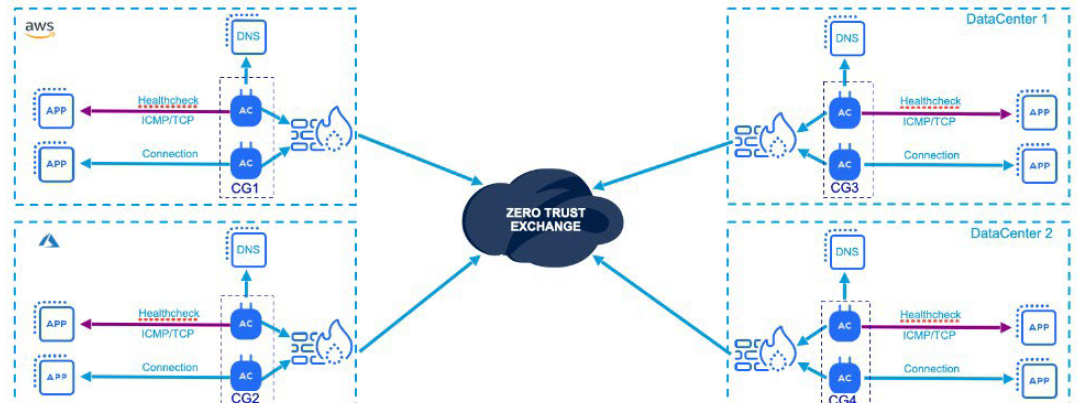
It’s important to ensure that App Connectors can reach both the internet and the internal applications they are meant to serve. This requires meeting specific routing and Layer 4 connectivity requirements for each application. Minimum hardware or VM specifications—such as CPU and memory—must also be met, and these requirements are continually updated on the Zscaler Help Portal.

Comment
TABLE OF CONTENTS
RECENT POSTS
- Installing Context-Aware Network Access Control using Cisco ISE Policies
- Designing Network Access Control that is Scalable using Cisco ISE Architecture
- Enterprise Network Access Control and Policy Enforcement using Cisco ISE
- Secure Device Administration and Network Access Using AAA Architecture
- Designing Enterprise-Class Hybrid Cloud Connectivity Using AWS Networking Services
- Exploring Core AWS Networking and Messaging Concepts for Modern Cloud Architectures
- Understanding Key AWS Services for Modern Cloud Architectures
- Building a Strong AWS Foundation with Amazon S3, EC2, and Virtual Private Cloud
- Understanding the ENSDWI Course: Advanced Cisco SD-WAN (Viptela) Concepts
- A Complete Guide to the DCACI-A Course: Mastering Advanced Cisco ACI Concepts


LEAVE A COMMENT
Please login here to comment.