
EMAIL SUPPORT
dclessons@dclessons.comLOCATION
USPolicy Framework
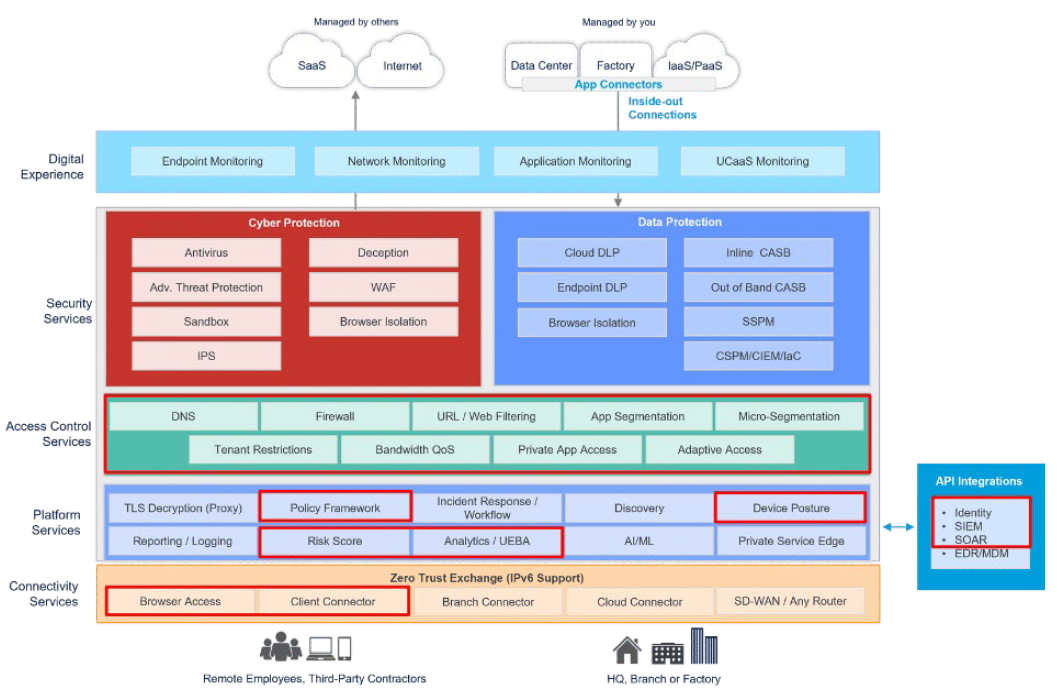
In this section, we'll review the pieces of the Zero Trust Exchange diagram that are highlighted in red below.
What Is the Policy Framework?
The Policy Framework, a core component of Zscaler’s Platform Services, operates across multiple layers of the Zero Trust Exchange (ZTE). It consumes signals from identity platforms and connectivity services—such as Browser Access and the Zscaler Client Connector—to establish rich user and device context. This context strengthens and informs key ZTE capabilities, including Risk Scoring, User Analytics, Access Control, and Device Posture, while enhancing enforcement across Cyber Protection, Data Protection, and Access Control services.
To understand the Policy Framework, it is essential to examine how the Zero Trust Exchange implements Zero Trust principles, including user identification, authentication, access control, network policy enforcement, and SSL/TLS inspection. The framework leverages inputs such as SAML assertions, Zscaler Client Connector telemetry, and device posture signals to determine user entitlements, including access to specific Zscaler services. Decisions related to SSL inspection are also policy-driven and take into account factors such as certificate validity and error conditions.
Policy Framework Components and Flow
The Policy Framework begins by identifying the user and determining which identity provider should be used for authentication. This can be influenced through installation parameters and configuration settings. Based on this information, the Zero Trust Exchange evaluates whether the user is permitted to connect.
Authentication is performed through a SAML identity provider (IdP), which applies its own policies to determine whether to issue a SAML assertion. Zscaler consumes this assertion and uses it to determine which components of the Zero Trust Exchange the user is authorized to access.
Once authenticated, the Policy Framework evaluates how the user is connected—whether through browser-based access, privileged remote access, isolation, or the Zscaler Client Connector. The Client Connector provides additional context, such as trusted network identification, enabling policies that define which services should be available based on the user’s network location.
Network-based policies further influence how users connect to the platform, including whether traffic is steered to public or private Service Edges. Client Connector telemetry also enables decisions related to client version enforcement, profile assignment, and forwarding configuration.
Using a combination of identity data, network context, and device posture, the Policy Framework determines whether services such as Zscaler Internet Access (ZIA), Zscaler Private Access (ZPA), and Zscaler Digital Experience (ZDX) should be enabled. These decisions can vary by use case—for example, enabling ZIA without ZPA or ZDX, or vice versa.
Additional inputs such as SAML authentication results, SCIM provisioning data, SOAR integrations, and user behavior analytics contribute to building a comprehensive risk posture. This risk context is then used to make informed access decisions for both public and private applications, including distinguishing between managed and unmanaged devices.
Finally, the Policy Framework governs SSL/TLS inspection behavior. Policies determine whether traffic should be inspected, how certificate errors are handled, and whether connections should be allowed or blocked in cases such as invalid certificates, expired certificates, unsigned certificates, or missing Server Name Indication (SNI).
User Authentication and Policy Configuration in the Zero Trust Exchange
User authentication and policy configuration are foundational to the Zero Trust Exchange. Together, they enable strong security enforcement while maintaining a seamless user experience. By continuously evaluating identity, device, network, and risk signals, Zscaler ensures consistent policy enforcement and effective risk management across the platform.
Client Connector Authentication
- When a user is prompted to enter a username, the domain portion (after @) is used to identify the appropriate Identity Provider (IdP). The user is then redirected to authenticate with that IdP.
- If the Zscaler Client Connector is installed with the
–userDomainoption, the specified domain is directly mapped to an Identity Provider, enabling automatic redirection for authentication.
Browser-Based Access Authentication
- Users are prompted to enter a username or email address when multiple Identity Providers are configured. The domain portion (after @) determines the appropriate Identity Provider for authentication.
- If only a single Identity Provider is configured, users are automatically redirected to authenticate with that provider without any prompt.
Single vs. Multiple Identity Providers
Most organizations typically use a single Identity Provider for authentication. However, scenarios such as mergers and acquisitions or cloud migration may require support for multiple Identity Providers.
To configure multiple Identity Providers, the following steps are required:
- Add Identity Providers: Register additional Identity Providers within the administration configuration.
- Configure Domains: Associate user domains with the corresponding Identity Providers.
- User Login: When accessing the Zscaler Client Connector or Browser-Based Access, users may be prompted to enter their credentials.
- Policy Configuration: Create policies that map domains to specific Identity Providers. Authentication prompts can be enforced or bypassed using installer options within the Zscaler Client Connector.
After a user is authenticated to Zscaler Internet Access (ZIA), SAML attributes are passed to the Mobile Admin. Mobile Admin policies then determine whether the user is entitled to Zscaler Private Access (ZPA) and Zscaler Digital Experience (ZDX) based on their group memberships.
Service entitlements are enforced centrally to ensure that users are granted access only to the Zscaler services appropriate for their role and security posture.
To configure service entitlement, follow these steps:
- Add Identity Providers: Integrate the required Identity Providers into Zscaler Internet Access.
- Configure Group Attributes: Define and map user group attributes from the Identity Provider.
- Establish Entitlement Policies in Mobile Admin: Specify which user groups are entitled to access Zscaler Private Access and Zscaler Digital Experience.
Policy for Zscaler Internet Access
The Zscaler Internet Access (ZIA) policy framework enables centralized control over how data packets are processed, inspected, and enforced within the service. This framework ensures secure, efficient, and reliable internet access by applying consistent security and traffic management policies across all users.
To understand how ZIA enforces policy, it is important to examine the sequence of processing stages that traffic follows as it passes through the Service Edge. These stages include the following key areas:
- Policy Framework and Operational Flow in ZIA
- Structured Rules and Criteria in Web Proxy Configuration
- Security Policy and Firewall Configuration in ZIA
- Policy Configuration and Actions for Network Address Translation (NAT) and Intrusion Prevention System (IPS)
The discussion begins with the Policy Framework and operational flow within Zscaler Internet Access.
Policy Framework and Operational Flow in ZIA
Zscaler Internet Access uses a structured and layered policy framework to manage traffic flow and enforce security controls. This framework incorporates multiple inspection and enforcement mechanisms, including the proxy engine, URL and file type controls, data loss prevention (DLP), firewall policies, NAT controls, IPS policies, bandwidth management, and additional security services.
These policies work together to provide comprehensive protection by inspecting HTTP and HTTPS traffic, enforcing URL filtering, performing file analysis and sandboxing, and applying data protection controls. The result is consistent threat detection, data protection, and policy enforcement across all internet-bound traffic.
A well-defined operational flow ensures that traffic is processed efficiently and securely as it traverses the Service Edge. When a client establishes a tunnel to the Service Edge, the tunnel is terminated and traffic is classified—such as HTTP or HTTPS—before being forwarded to the proxy engine for further inspection and policy enforcement.
Understanding the order of operations within this framework is critical, as each policy stage builds upon the previous one to deliver layered security and effective traffic management within Zscaler Internet Access.
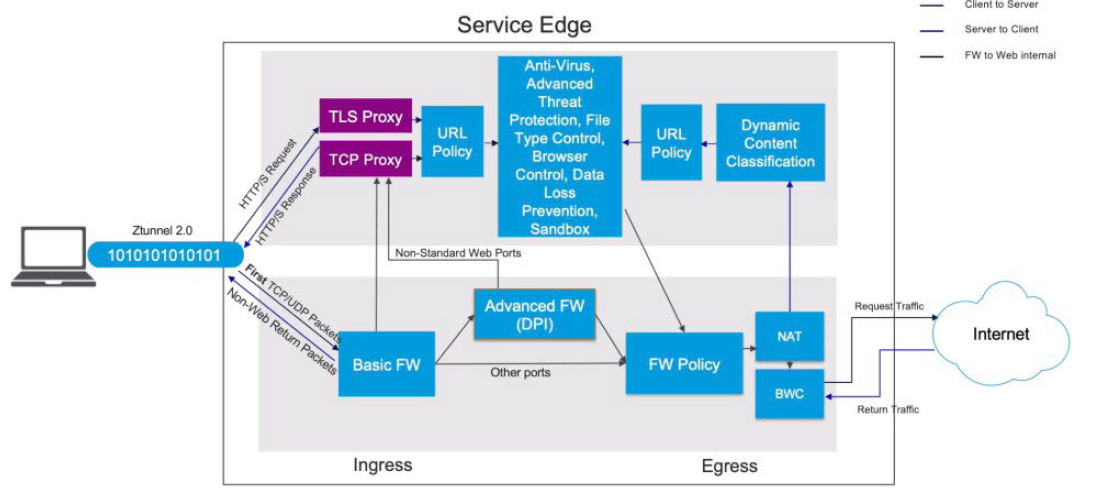
All non-HTTP and non-HTTPS traffic is processed through the firewall layer. The Basic Firewall may classify HTTP and HTTPS traffic based on port information, while the Advanced Firewall performs packet inspection and analyzes header data to accurately identify HTTP and HTTPS traffic. Once identified, HTTP and HTTPS traffic is forwarded to the proxy modules for further processing.
All remaining traffic flows through the Firewall policy, NAT Control policy, and Intrusion Prevention System (IPS) policy before passing through Bandwidth Control and exiting to the internet. Return traffic follows the same policy path in reverse.
Traffic identified as HTTP or HTTPS is processed by the proxy module, where TLS inspection policies are applied. These policies evaluate factors such as OCSP (Online Certificate Status Protocol) responses, certificate validity, and URL policy requirements to determine whether inspection should occur.
After TLS inspection, traffic is evaluated against additional controls, including File Type Control, Browser Control, and Data Loss Prevention (DLP). During this stage, the payload is analyzed to identify potential policy violations. If DLP rules are triggered, the traffic may be blocked. Traffic is also evaluated against Sandbox policies for advanced threat analysis.
Following proxy-based inspection, traffic egresses through the firewall, where NAT and IPS controls are applied before it is forwarded to the internet. Response traffic then returns through the same inspection modules.
On the return path, traffic is processed through Dynamic Content Classification, where the request and response payloads may trigger website recategorization based on newly observed content. URL policies are re-applied, and response payloads are inspected by Antivirus, Advanced Threat Protection (ATP), and File Type Control. Browser Control and Data Loss Prevention policies are also enforced on inbound traffic.
If required, files may be forwarded to the Sandbox for detonation and behavioral analysis to detect zero-day threats. Based on policy, users may receive a quarantine notification while the file is inspected before download is permitted. Once inspection is complete, traffic passes back through the URL policy and TLS proxy, where it is re-encrypted using a man-in-the-middle certificate and delivered securely to the client.
Policy Resources and Configuration Considerations
Effective policy enforcement relies on several configurable resources. Many of these are predefined, but administrators can customize them as needed. For example:
- URL Categories (Access Control Module): Used to create custom categories or override existing classifications.
- Bandwidth Classes: Used for bandwidth management by mapping URL categories to bandwidth classes and applying them through Bandwidth Management policies.
These resources enable granular control over traffic behavior, performance, and security within Zscaler Internet Access.
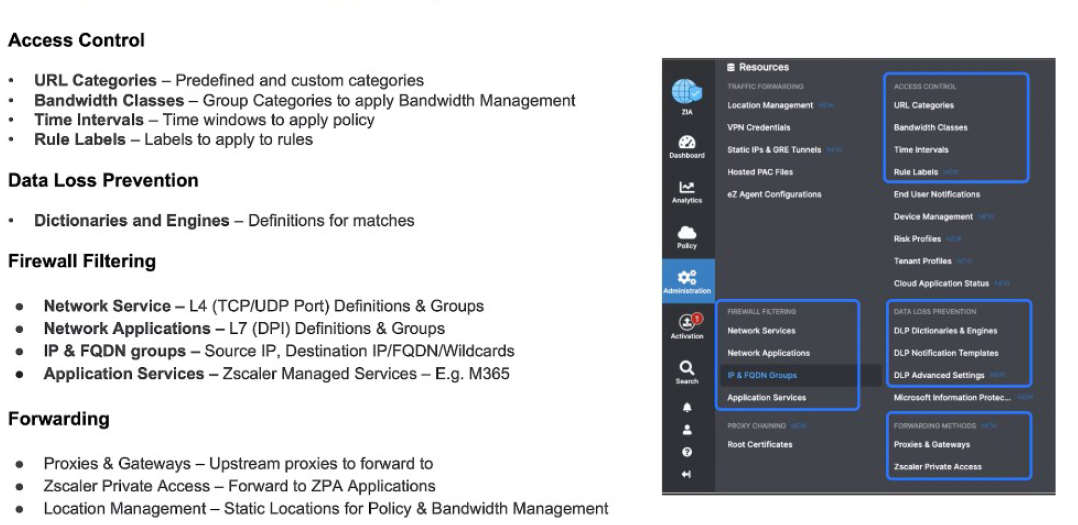
You can also define time intervals that determine when specific policies apply. For example, a policy may be enforced more restrictively during business hours, such as Monday through Friday from 9:00 AM to 5:00 PM. In addition, Rule Labels can be applied to policies to make them easier to identify and manage.
For Data Loss Prevention (DLP), policies are built using dictionaries and engines. A dictionary defines the matching criteria—such as regular expressions or patterns for credit card numbers—while a DLP engine combines one or more dictionaries and applies them within policy rules. For instance, a DLP engine may correlate Social Security numbers and credit card numbers to identify Personally Identifiable Information (PII).
Within Firewall Filtering, administrators define network services, which include Layer 4 TCP and UDP port definitions. These services can be grouped and reused across firewall rules, allowing existing rules to be added or modified efficiently.
Similarly, Network Applications provide Layer 7 (DPI-based) application definitions and groups. Administrators can create custom application groups to support granular application-level policy enforcement.
IP and FQDN objects represent source and destination IP addresses, fully qualified domain names (FQDNs), and wildcard entries. These objects are used within firewall policies to control traffic flows. Additionally, Application Services—such as Zscaler-managed definitions for services like Microsoft 365—are provided as read-only resources for consistent policy enforcement.
For Traffic Forwarding, several modules are available. Proxies and Gateways define upstream proxies used to forward traffic when required. Zscaler Private Access (ZPA) definitions represent application segments that traffic can be forwarded to based on policy rules, such as for Source IP Anchoring. Location Management defines static IP addresses, location names, and GRE tunnels, which are used in both policy enforcement and bandwidth management.
Structured Rules and Criteria in Web Proxy Configuration
Zscaler’s web proxy configuration provides a structured approach to rule creation and enforcement. It supports ordered rule evaluation, consistent naming conventions, SSL inspection policies, and clearly defined criteria for rule application. These criteria include URL categories, user groups, request methods, DLP conditions, and corresponding actions.
Effective web proxy rule management requires careful consideration of these criteria to ensure secure user access, appropriate bandwidth allocation, and consistent policy enforcement. The flexibility of the rule framework allows organizations to adapt policies to diverse operational requirements and evolving threat landscapes.
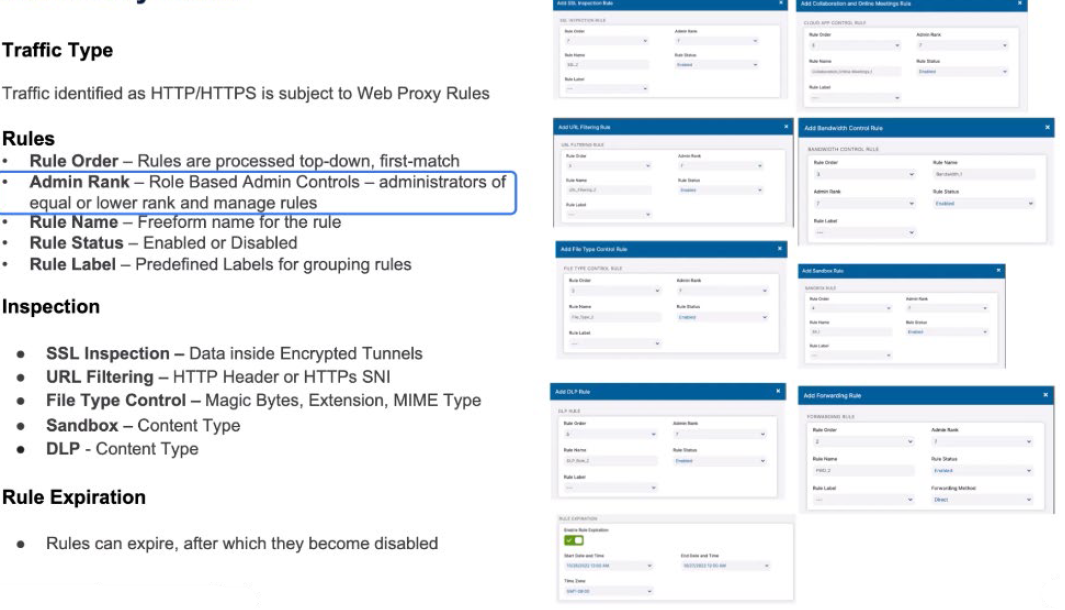
All web proxy rules have a standard format. In terms of the rule order, where does this rule, when you add it, sit within the ordered list. All rules are processed top-down, first-match. The Admin Rank is a definition of which administrators can manage this rule. Administrators of equal or lower rank can manage those rules.
The rule name is a definition of the rule. It’s a free-form name for your rule as you enter it and whether a rule is enabled or not is the status. And then the Predefined Labels can be mapped onto those rules. A Rule Label is a static definition that’s previously been defined by an administrator, whereas the Rule Name is a free-form one that might be created by the user that’s creating that rule.
Within SSL Inspection rules, you’re going to make decisions based upon the data inside the encrypted tunnels. The URL filtering rule is based upon the HTTP header or the SNI. For File Type Control, you have the Magic Bytes, the extension, the MIME type to identify the file type. The Sandbox is going to understand what the content is to make a decision to hand files off to the Sandbox. For data loss prevention, we’re going to look at the content type to make decisions.
We may also make Rule Expiration decisions. How long does this rule exist for? It might only come into effect at a certain time and it might expire at a certain time. We can have temporary rules for certain conditions. An example of this might be that there’s an announcement by the government and we want to prioritize that over all other rules and make sure that it doesn’t saturate bandwidth. Or it might be a sporting event where you know that’s going to happen and you want to de-prioritize that over all other rules.
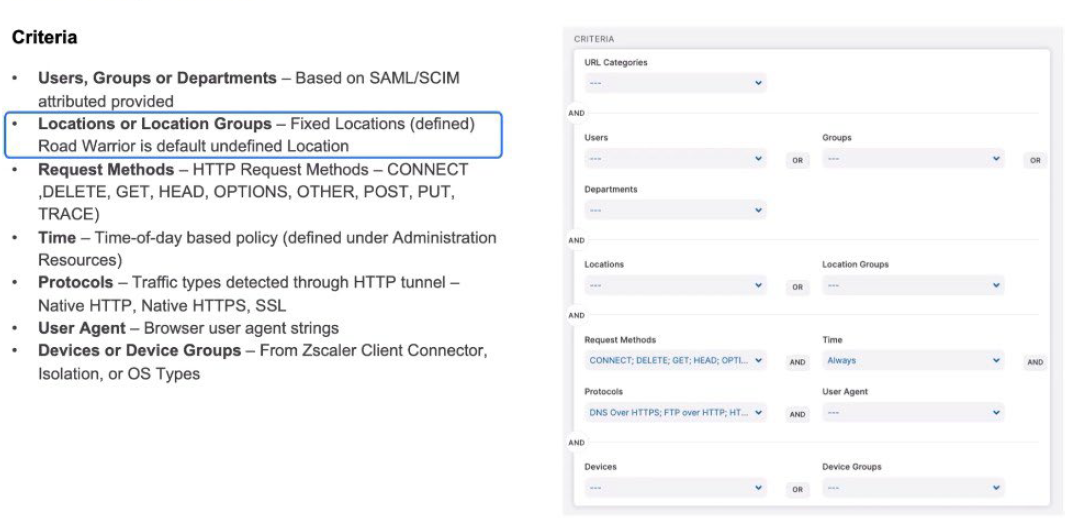
Let’s take a look at the criteria. For the Web Proxy rules, the criteria are relatively similar. What URL categories is it going to apply for? Which Users, Groups, and Departments is it going to apply for? Those are logically ORed together. The Locations or the Location Group; the fixed locations, and then road warrior (now known as remote user) is a default undefined location.
Anything that isn’t a known location is classed as road warrior (now known as remote user).
The request methods, whether it’s an HTTP CONNECT, a POST, a DELETE. What time does this apply? What protocols does it apply for and what user agents does it apply for? These might be ANDed together. And then the device types, whether they’re Zscaler Client Connectors? Are they coming from Isolation or can we see it from the operating system types? Within all of those criteria, we define them. Certain criteria like user or group or department, they’re ANDed together across each of those segments to make a criteria that will trigger for that rule as it’s processed.
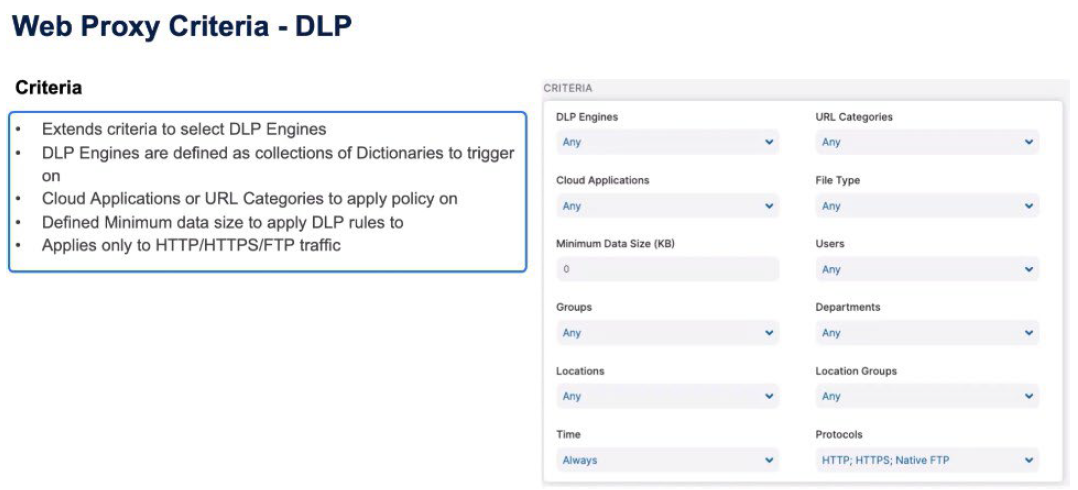
For Data Loss Prevention (DLP) rules, the criteria extend to include the DLP Engines as well as the Cloud Application information, the file type information, and a minimum size for that object to trigger on. Again the Users class, Group, Department, Locations, Location Groups, Time, and Protocols, all apply but the protocol can only be HTTP or HTTPS, or native FTP for this rule to trigger.
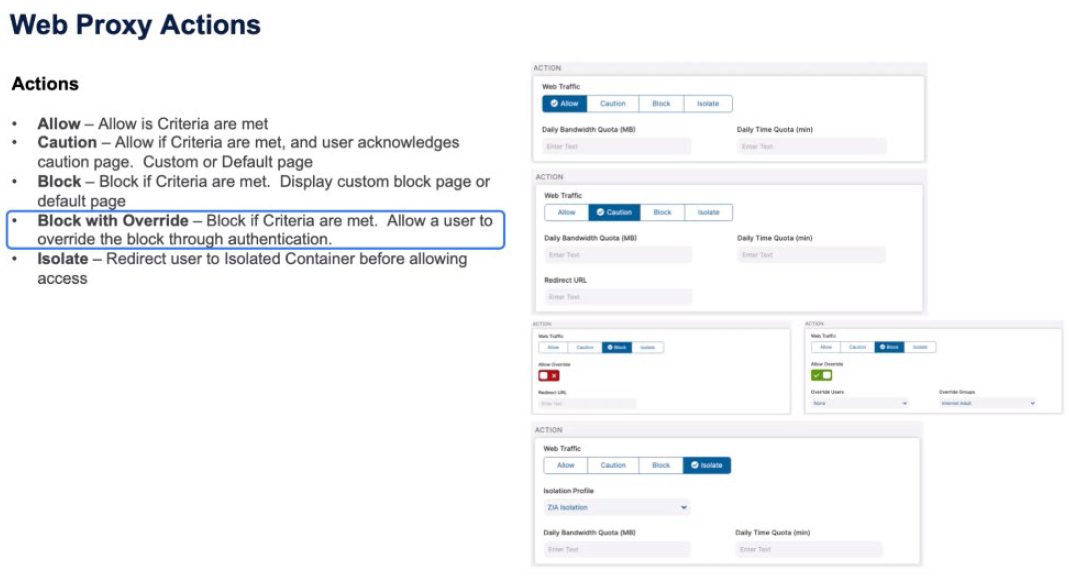
The actions, again, are relatively similar across all the Web Proxy objects. We can either allow the transaction if the criteria are met. We can Caution if those criteria are met. The user needs to acknowledge that Caution page and that Caution page will be the default Caution page if the redirect URL is empty or it can be a custom page that the user needs to acknowledge.
The same with a Block message. If the criteria are met, the user is displayed a default Block page or a redirect to a custom Block page. You may also have a Block with Override. You are going to block the request if the criteria are met, but you are also going to allow the user to override that Block message through a new authentication mechanism.
A good example of this is when Zscaler is deployed in schools. You want a default Block page, but you want the teacher to be able to authorize the override of a rule because of certain class conditions or their own judgment. Then, the final one is Isolate. For whatever reason we want to move the user from accessing the website directly to putting them in an isolated container before allowing access.
That might be a data protection requirement or it might be a user protection because of the category of the website or we’ve made a decision based on traffic flow to use machine learning and artificial intelligence to isolate based on previous conditions we’ve seen and dynamically isolate the user from the website
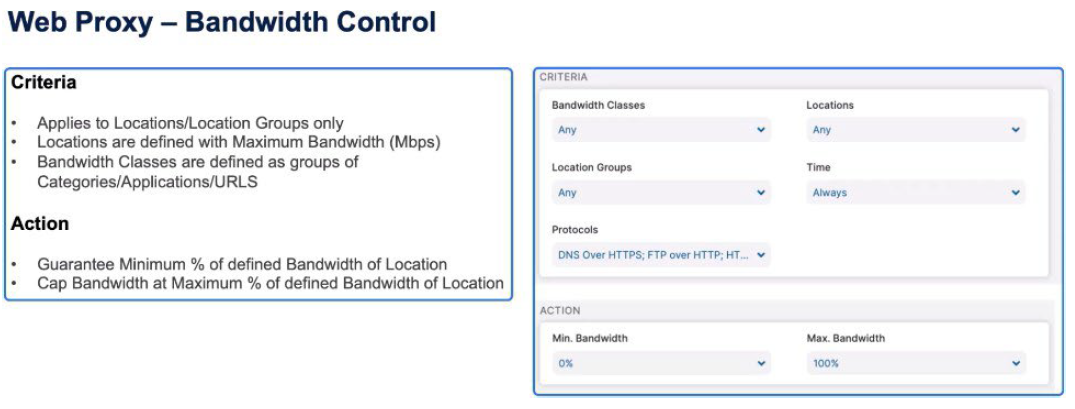
With Bandwidth Control, we’ve defined Bandwidth classes already in the Resources section and apply these to locations at certain times of day. We can then guarantee a minimum percentage of the bandwidth or cap for that class the maximum amount of bandwidth that can be consumed by that class.
Security Policy and Firewall Rules in ZIA
The security policy requires that all incoming and outgoing traffic be inspected, but there may be exceptions for specific URLs. Advanced Threat Protection assesses traffic using different factors to assign a risk score. Firewall rules are applied from top to bottom, taking into account user, device, and service criteria to make decisions, and the actions can include allowing, blocking, or logging traffic.
A comprehensive security policy ensures thorough network traffic inspection and allows specific URLs to be exempted. Advanced threat assessment tools enhance risk management, while well-structured firewall rules enable effective traffic control and logging for monitoring purposes.
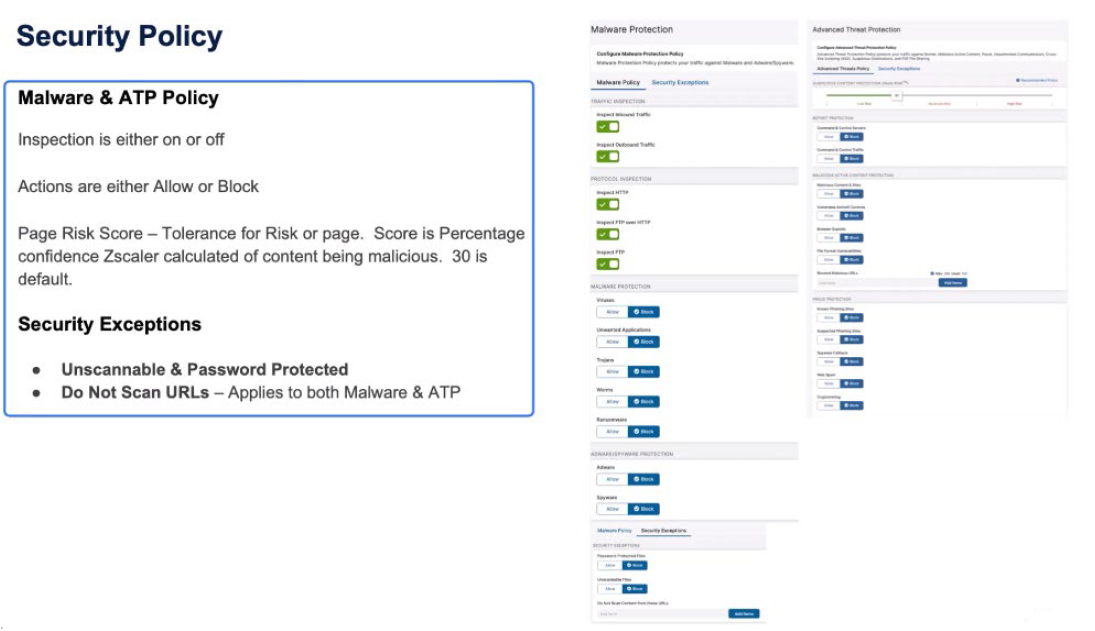
Security policy is absolute. For every transaction we want to apply the Security policy. We’re going to inspect all inbound and outbound traffic, to inspect HTTP, FTP over HTTP, native FTP, and apply all of the Malware Protection rules. But you might want to make decisions to not scan certain URLs or URIs. Now, when you make a decision not to scan traffic, it excludes it from both the Malware Protection and the Advanced Threat Protection.
Within Advanced Threat Protection, we have one of our botnet control, malicious content protection as well as fraud protection, and the Zscaler paid risk score to identify whether or not traffic should be allowed based on the score Zscaler has created for the content, where the user came from, where that page links to, the age of the website, where that website is hosted when we create this dynamic paid risk score.
It’s the content of the page and where that page links to that enables us to build this score and the tolerance for risk the organization has for that. The default is 30, which says we have a 30% confidence that this page is not malicious. Or, you could look at it the other way – if the score is 100, we have 100% confidence that this page is malicious and therefore should be blocked.The tolerance for risk is the customer’s decision of how much of the scores Zscaler provides do they believe is risky or not.
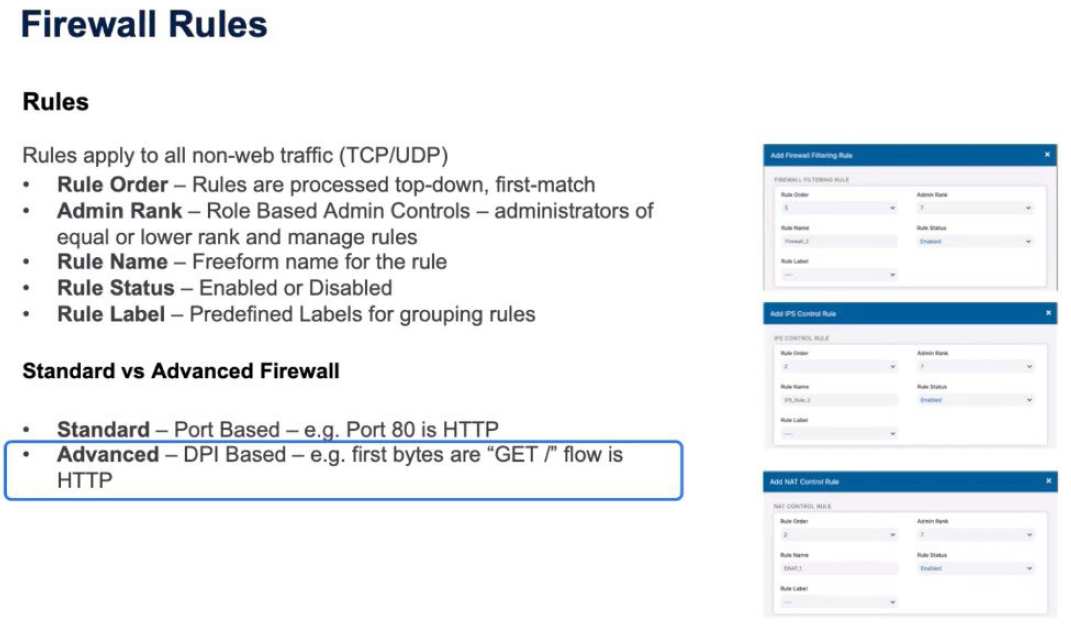
Firewall rules, similar to Web Proxy rules, have the same rule order; top-down first match. The Admin Rank – which administrators are able to administer this role. Administrators of equal and lower rank can manage the same rules. The Rule Name (the freeform name for the rule), Rule Status (again enabled or disabled), and the Rule Label are the predefined labels for those rules.
The rule is applied for the Standard or the Advanced Firewall. The decisions are based on Standard, which is the port-based rules. Port 80 is HTTP and the predefined rules come from the Resources tab or the Advanced Policy based on DPIs (deep packet inspections). Looking at the first Magic Bytes of the traffic, seeing a GET means that it’s HTTP, and we can identify that and pass it to the HTTP proxy.
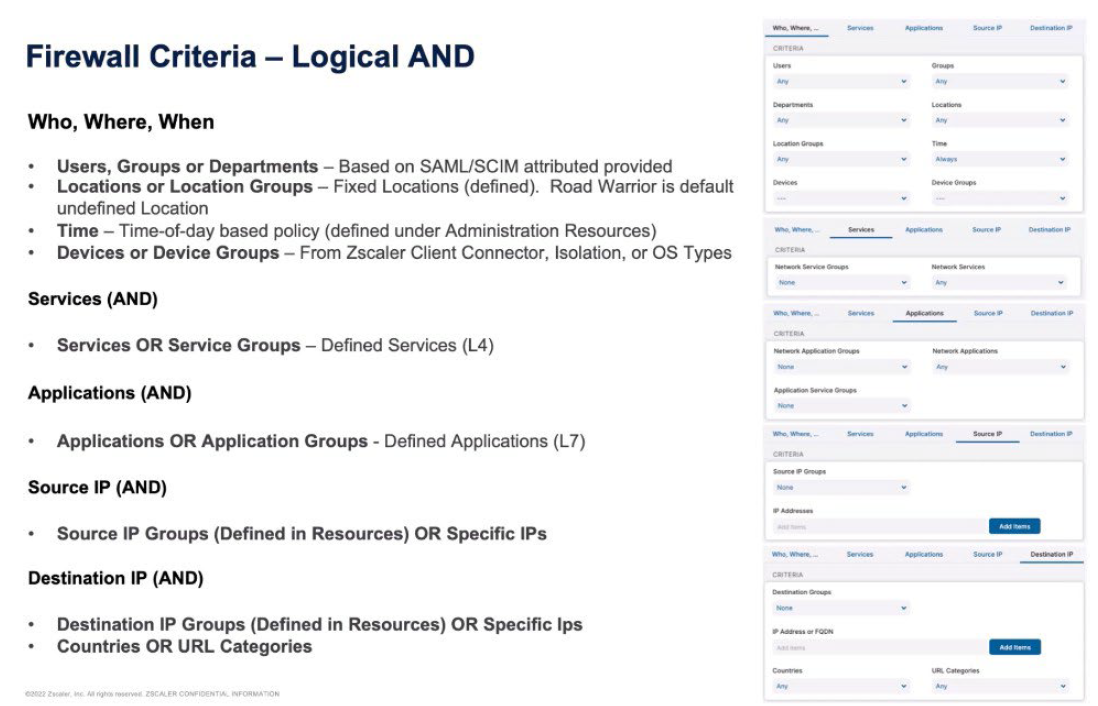
The rules and criteria for Firewall are then logically ANDed together across each of the different sections. We make a decision based on the first set of criteria that are user and device based. Users, Groups, Departments, Locations, Location Groups, the Time, the Devices, and the Device Groups. We ALL all of those together so it’s a User, all the Groups, all the Departments. Then logically AND those transactions with the services of the Service Group. The services are the Layer 4 services – the Standard Firewall port 80, port 443, port 3389 for remote desktop.
The Application rules are the Layer 7 definitions. Applications or Application Groups, and then the Source IP are the Source IP Groups defining resources, or specific source IPs and the final criteria is the destination. The Destination IP Group defines resources or specific IPs. and then you can also apply based on the country or URL categories. So I build a rule that is logically ANDed together between the who, the where, the services, the applications, the source IP, the destination IP, to build a complex rule that will then trigger.
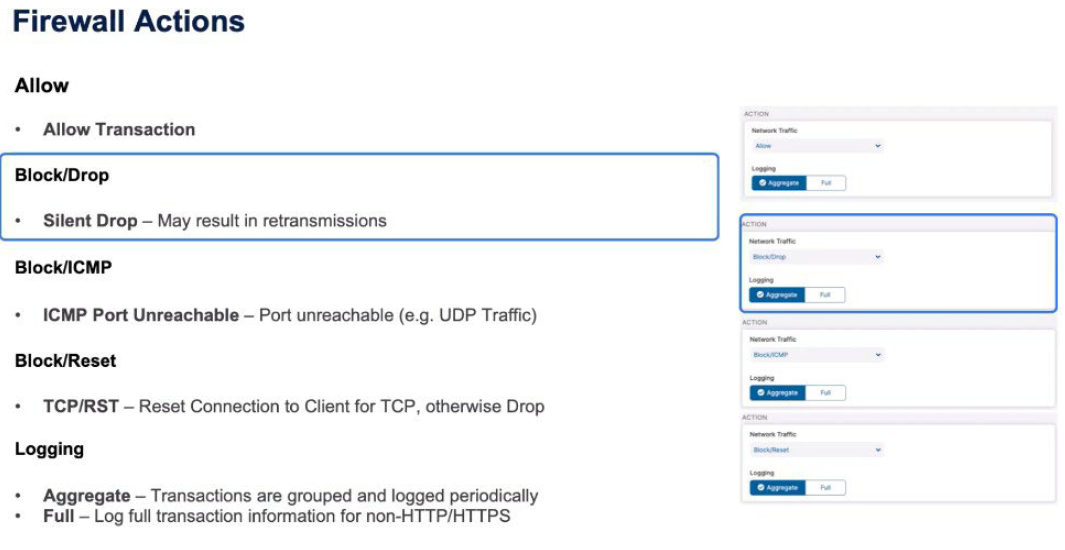
The actions when those rules trigger might be; ALLOW obviously to allow the transaction. BLOCK/Drop, which is a silent drop of that traffic that may result in retransmissions from the client. A BLOCK ICMP means that the client receives an ICMP port unreachable, which might be equal to a Drop for, say, UDP traffic. A BLOCK/RESET is when the client gets a TCP reset, which forcibly closes the connection, but obviously means that the client knows there’s a firewall in play. If it’s not TCP they just get a straight Drop so UDP retransmissions may occur.
Then you make a decision based on logging. Full logging for non-HTTP, HTTPS traffic, all of the transactions are aggregate. Transactions are grouped together and periodically logged.
Policy Configuration and Actions in Network Address Translation (NAT) and Intrusion Prevention System (IPS)
In Zscaler, NAT control operates similarly to firewall control, applying policies based on various criteria such as user attributes, location, time, and device type. It involves performing destination address translation and port address translation. Similarly, IPS criteria involve applying policies based on user, group, and location attributes, with actions including allowing, blocking, or resetting transactions and logging transactions for analysis.
Meticulous consideration of user attributes, location, time, and device type in policy implementation is essential for ensuring adequate network security. Additionally, leveraging IPS criteria and logging mechanisms to maintain vigilance against potential threats is crucial for proactive security management.
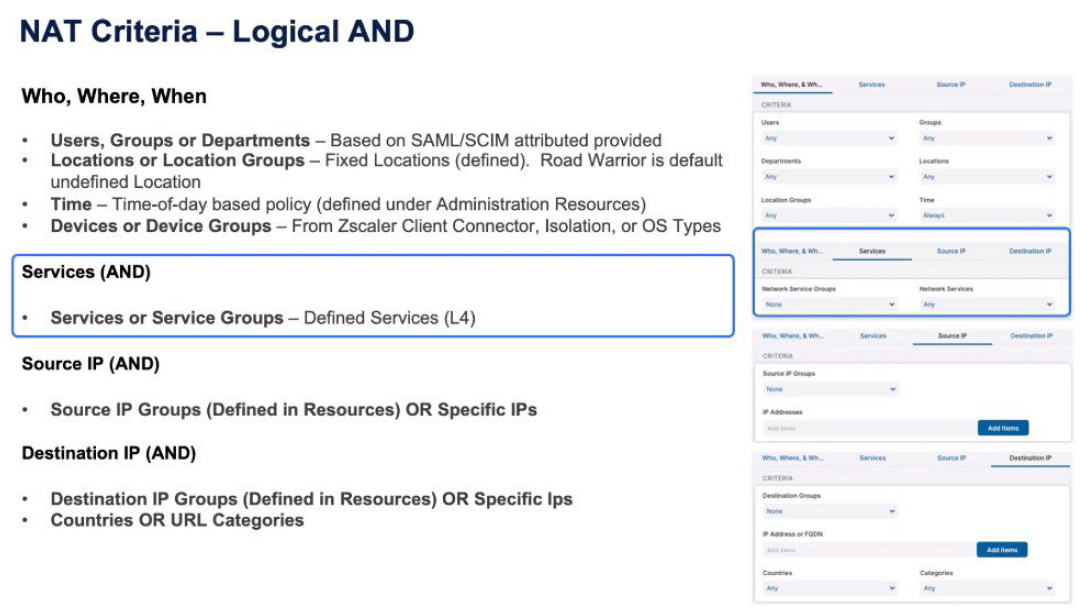
With NAT Control similar to Firewall Control, a logical AND between the who, the where, the services, the source IP, and the destination IP. So again, Users, Departments, Groups from the SAML/SCIM attributes, the Locations from the previously defined locations, the Time of
Day-based policy, and the Device and the Device Groups, and Operating System types.
The services are again the Layer 4 services from the Standard Firewall, the Source IP is specific source IPs in the resources or IPs that you enter in the rule and then the Destination IP. It’s obviously important to understand you can’t do Layer 7 rules or NAT because you have to make a NAT rule as the first packet that passes through, and therefore you never get to see the payload until you can make a Layer 7 rule for an address translation.
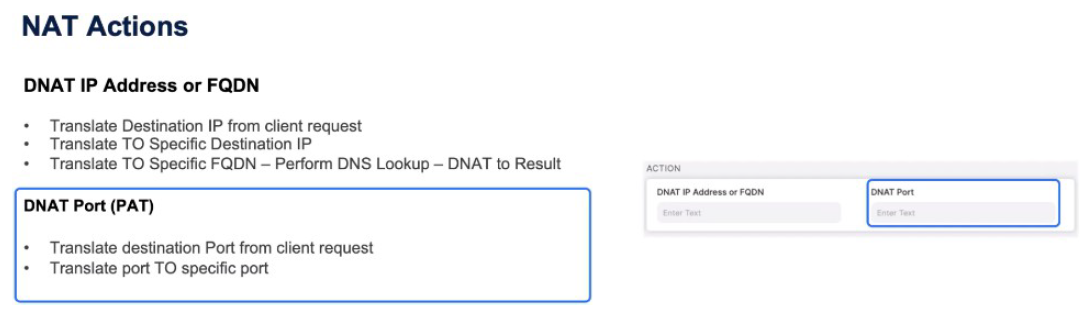
The NAT actions are, do I perform a destination address translation? So you are going to either destination NAT it to a specific IP or to an FQDN, which triggers the Zscaler Service Edge to perform a DNS Lookup and DNAT (Destination NAT) to the result of that DNS Lookup. Then you can do a DNAT on the port, which is a port address translation, which means you might say port 80 from the client changes to port 8080 when it egresses the Zscaler Service Edge.
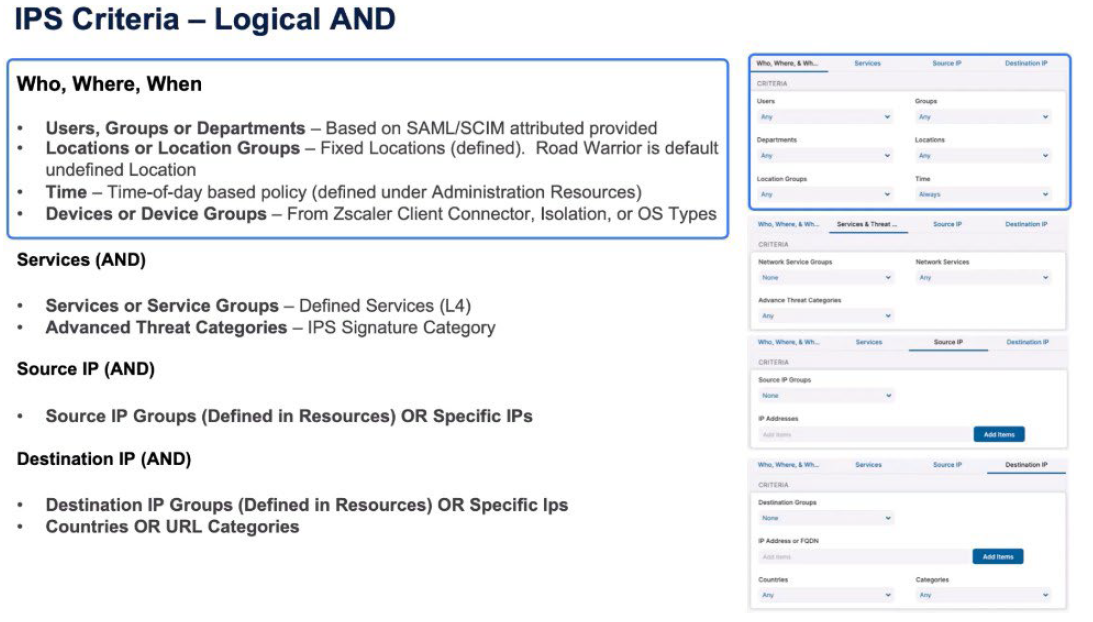
We look at the IPS criteria for the intrusion prevention system. We’re going to again apply policy based on User, Group, Department from the SAML/SCIM attributes, the Location or Location Groups from those definitions within the resources, the Time of day-based policy from the Resources section, and the Device or Device Groups from Zscaler Client Connector isolation or those Operating System types. There’s then a logical AND with the services so the Layer 4 services and the Advanced Threat Categories which are the IPS Signature categories.
Create a rule, then, based on the Source IP, again, logically ANDed with the other rules. Again, Source IP Groups (defined in Resources) or specific IPs created for this rule. And then the Destination IP, again, is a logical AND for all the other criteria. Is it an IP Group that’s defined in Resources or specific IP addresses ended in this rule? And they also include countries or URL categories.
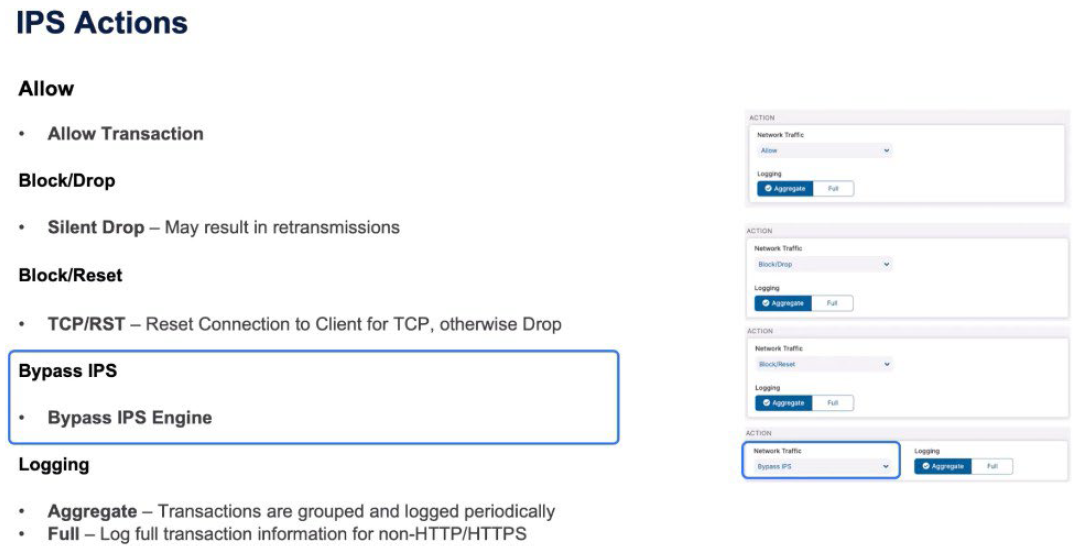
IPS actions are similar to Firewall actions. You may either allow the transaction if it's been identified as matching the rule. You may do a BLOCK, which is a silent Drop, which may result in retransmissions. A BLOCK/RESET, where you get a TCP reset towards the client, otherwise a single Drop for UDP. You may make a decision to bypass the IPS engine entirely if you are seeing, for example, false positives. And then the logging is similar to a firewall. You either do Full Logging of transactions for non-HTTP and HTTPS, or you do Aggregate Logging, which is periodically logging transactions as they’re grouped together.
Policy for Zscaler Private Access
ZPA enables secure access to internal applications without requiring a traditional VPN. The policy for ZPA involves defining rules and configurations to ensure secure and controlled access to specific resources within an organization's network.
Here's a general overview of the policy aspects for Zscaler Private Access:
- Private Access Order of Operations
- Analyzing Access Policy Criteria for ZPA
Private Access Order of Operations
ZPA prioritizes user authentication via SAML/SCIM attributes and device posture checks. It evaluates policies based on user credentials and device attributes, including compliance status and network context.
The order of operations involves:
- Connecting through the ZPA Public or Private Service Edge.
- Evaluating access policies.
- Applying isolation and inspection policies.
- Establishing tunnels between the Zscaler Client Connector and App Connectors.
ZPA policies ensure secure access by scrutinizing user and device attributes, emphasizing top-down policy evaluation, and implementing granular access controls based on user authentication and device posture.
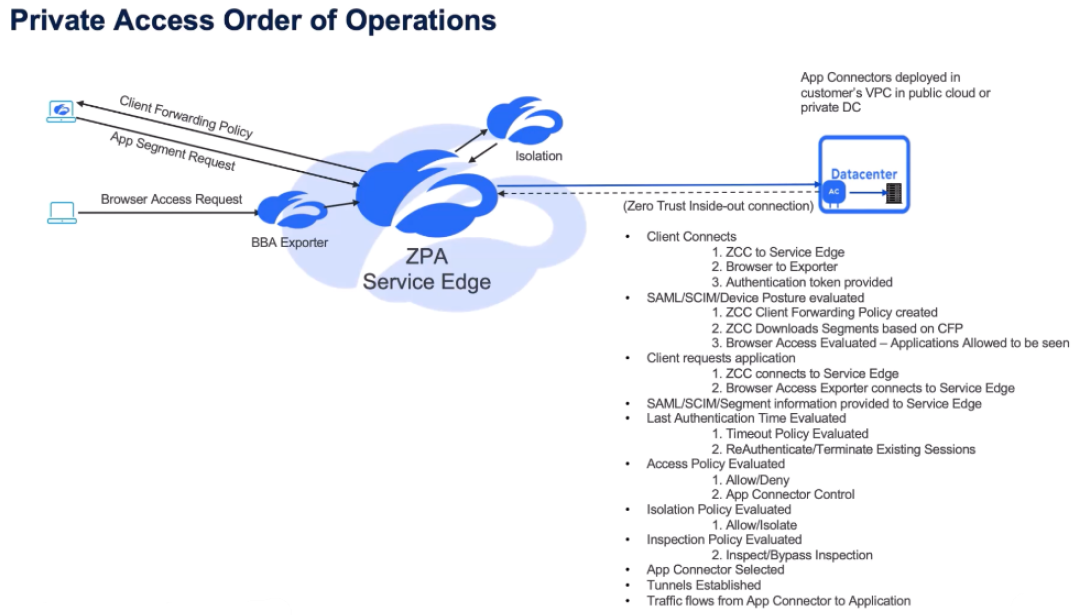
Let's take a look at the policy for Zscaler Private Access (ZPA). It's important, again, to understand the order of operations – slightly different for Zscaler Private Access compared to Zscaler Internet Access. It starts with the Zscaler Client Connector connecting to the ZPA Public or Private Service Edge. As part of that connection, the Service Edge understands if it is the Zscaler Client Connector that provides information about the user credentials, or the user logging into the Exporter and the authentication token being provided.
The SAML/SCIM/Device posture is evaluated as part of that connection. The Service Edge makes a Client Forwarding policy for Zscaler Client Connector. And that's the definition - based on the policy - of what app segments the user is allowed to download or the Zscaler Client Connector can download. With browser-based access, the user is logging into the Exporter function and as part of that authentication, the Service Edge identifies which applications the user is allowed to see and therefore which ones they're allowed to connect to.
The Zscaler Client Connector downloads its Client Forwarding policy. The user makes a request for an application, so the client then connects to the application, the Zscaler Client Connector connects to the Service Edge and the request is made. Or, the user makes the request from the Service Edge from the Exporter. Once again, as part of every transaction, the SAML/SCIM attribute, the segment information is provided, and that policy is evaluated.
And the first thing that's going to be evaluated is the Timeout policy. Should the user
re-authenticate based on these timeouts? Then the access policy is evaluated based on the criteria provided - the SAML/SCIM/Device information, the application segment - is the user allowed or denied access to that. Then apply an isolation policy, should the user be isolated for this transaction. And then, when the transaction is allowed through - whether it's isolated from the Exporter or from the Zscaler Client Connector - Inspection policy will be applied for those transactions. We're then going to make a decision on which App Connector is going to service that request. The tunnels are established and then the traffic flows, between the Zscaler Client Connector, the App Connector, and from the App Connector to the application.
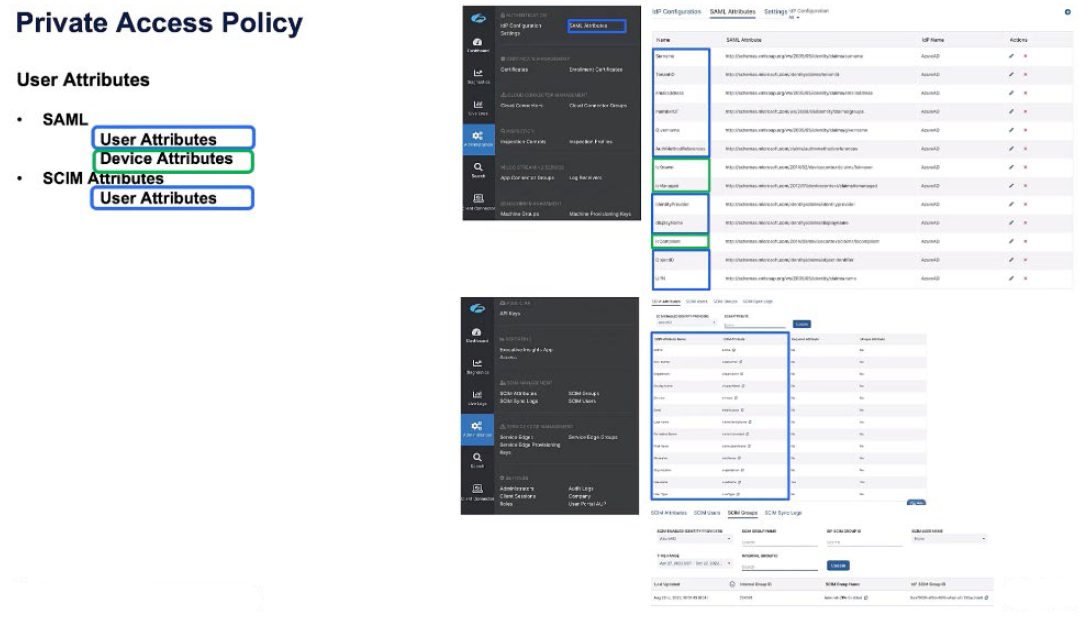
The Zscaler Private Access policy is predicated first off on SAML attributes and SCIM attributes. A SAML attribute might have user attributes as well as device attributes, and a SCIM attribute is entirely device-based, but is pushed through the SCIM sync.
If we look on the right-hand side here, we can see a bunch of SAML attributes, the Surname, the Tenant ID, the email address, are all user-based credentials, the identity provider, the user principal name. But, in green, we also see device attributes returned from Azure AD. Is the device known? Is the device managed? Is the device complaint against the compliance policy?
When we look at the SCIM attributes, or the SCIM group information, these are all user based - the user email address, the nickname, the username, and then the user is a member of internet ZPA-enabled groups. So SCIM is entirely user based. SAML may contain device information as well for us to apply policy on.
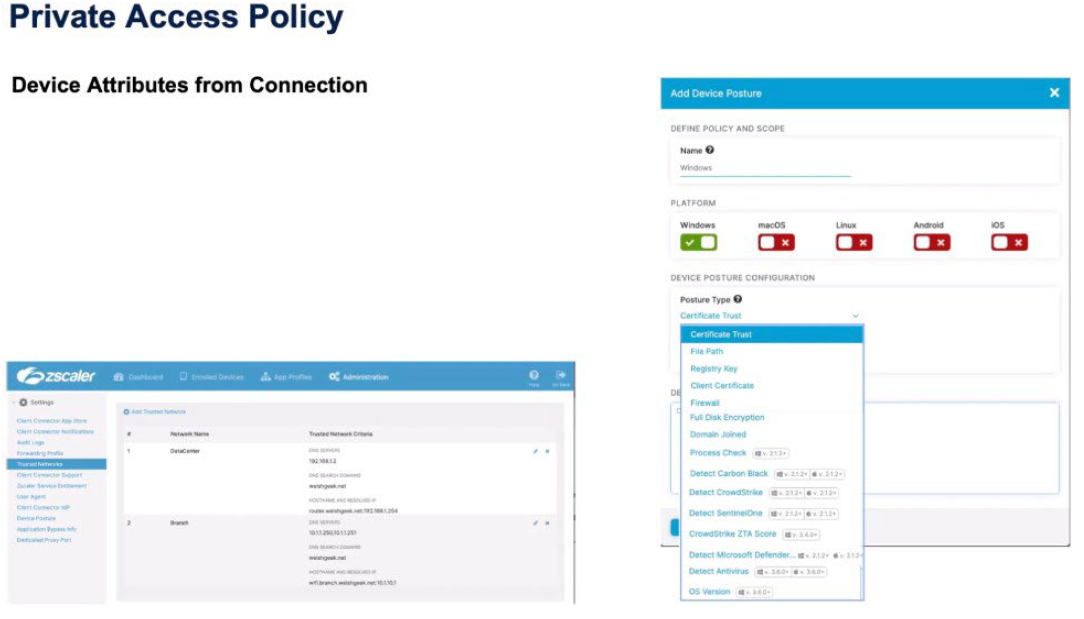
We also get device attributes from the connection, so we want to understand either the device posture information, did the device pass these posture checks? We understand the Trusted Network criteria for the device. Is it in the data center, is it in the branch, is it a roaming user?
And then we also consume information about the client type. Is it a Zscaler Client Connector? Is it a Web Browser? Is it an isolated browser? Have we been forwarded traffic through the Zero Trust Exchange from the Zscaler Internet Access service? And then, obviously, we also have other forwarding mechanisms that might be the App Connector or machine tunnels for passing traffic through to the Zero Trust Exchange.
So the policy order similar to Zscaler Internet Access is top-down, first-match. There's an implied default Deny at the bottom and the same as any Firewall policy. So you'd make an explicit Allow for an application segment in policy and then you can either write an explicit Deny for that segment or, if all of your other policies are explicit, you can leave it for the default Deny to happen at the bottom.
It's a question of how tidy or how explicit you want your access policy to be.
Policy types:
- Access Policy: Is the user allowed or denied access?
- Timeout policy: When should the user re-authenticate to access the application?
- Client Forwarding Policy: Makes a decision which application segments will the Zscaler Client Connector get as its definitions.
- Isolation Policy: Dictates should this transaction be moved into the isolated container, and then Inspection policy as to whether or not the ZPA Inspection policy will apply to these transactions.
Analyzing Access Policy Criteria for ZPA
In the Zscaler Zero Trust Exchange, the access policy combines various criteria such as application segments, SAML/SCIM attributes, client types, posture profiles, and trusted networks to determine access rights, reauthentication intervals, idle timeouts, client forwarding, inspection, and isolation policies.
Efficient access policies in the Zscaler Zero Trust Exchange rely on carefully considering and combining multiple criteria to ensure secure and appropriate access for users, with the flexibility to adjust based on specific business needs and application requirements.
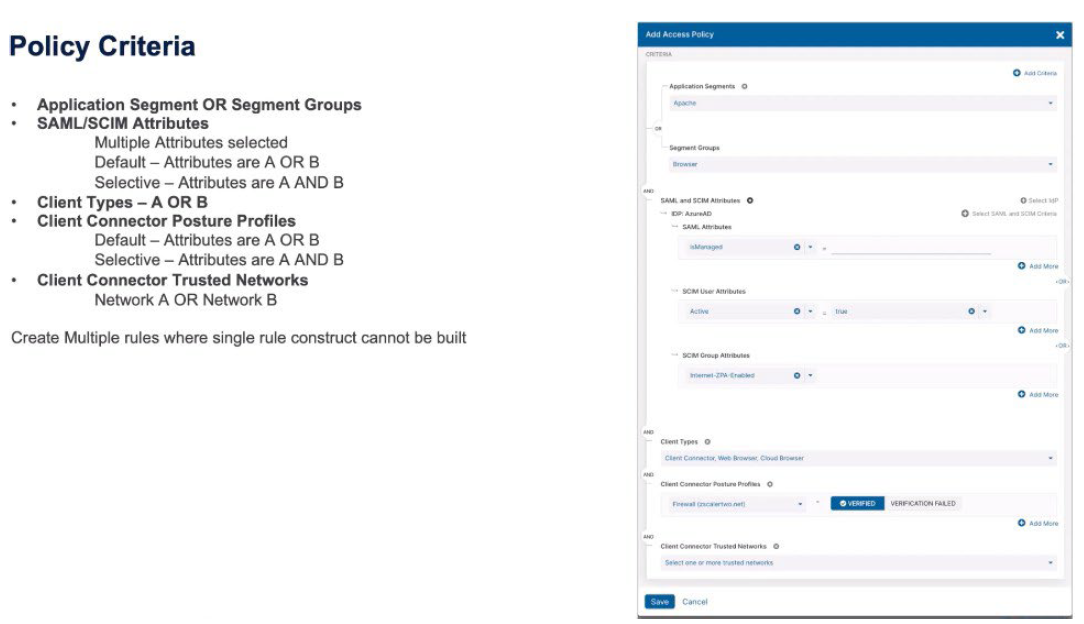
Let's take a look at the criteria, starting with the application segment or the segment groups. Those are logically ORed together. When we look at the SAML and SCIM attributes, we might have SAML attributes, SCIM attributes, or SCIM Group attributes. Those can be logically ORed together, or ANDed together, depending if you want to make these things more specific or more congruent. Then we have client types. Those are ORed together. Zscaler Client Connector, or Web Browser, or Cloud Browser. The Zscaler Client Connector posture profiles. Those can either be ORed together, or ANDed together, to make multiple posture profiles apply for a rule, or make a decision to have to be verified, or if a verification fails.
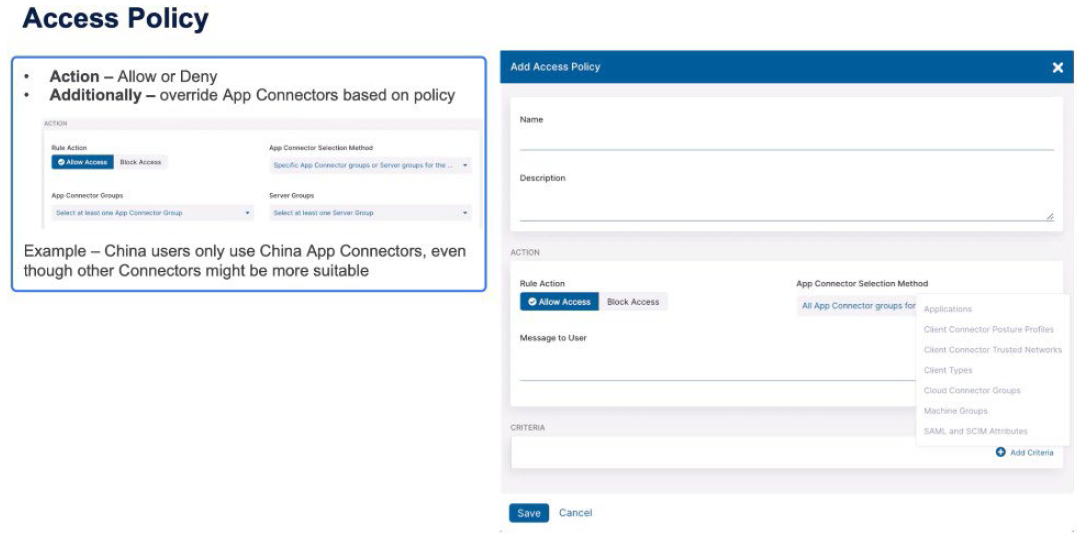
And then the ZScaler Client Connector trusted networks. Again, you might select multiple trusted networks which are ORed together. So each of those criteria – the segments, the SAML/SCIM attributes, the client types, the posture profiles, and the trusted networks - are then ANDed together to make that rule trigger. Within the access policy, we're either going to Allow or Deny a transaction, and as part of that, we might also make a decision to specifically change which App Connectors are going to be used for a transaction.
An example of this, we might identify users as being in China and specifically want to use the China App Connectors where everywhere else in the world we'd use the most suitable connector that's available. With access policy, we can make criteria based on applications, the Zscaler Client Connector posture profiles, the trusted networks, the client types, the Zscaler Cloud Connector groups (if we're using Zscaler Cloud Connector) or machine groups, so the forwarding mechanisms, and then the SAML and SCIM attributes.
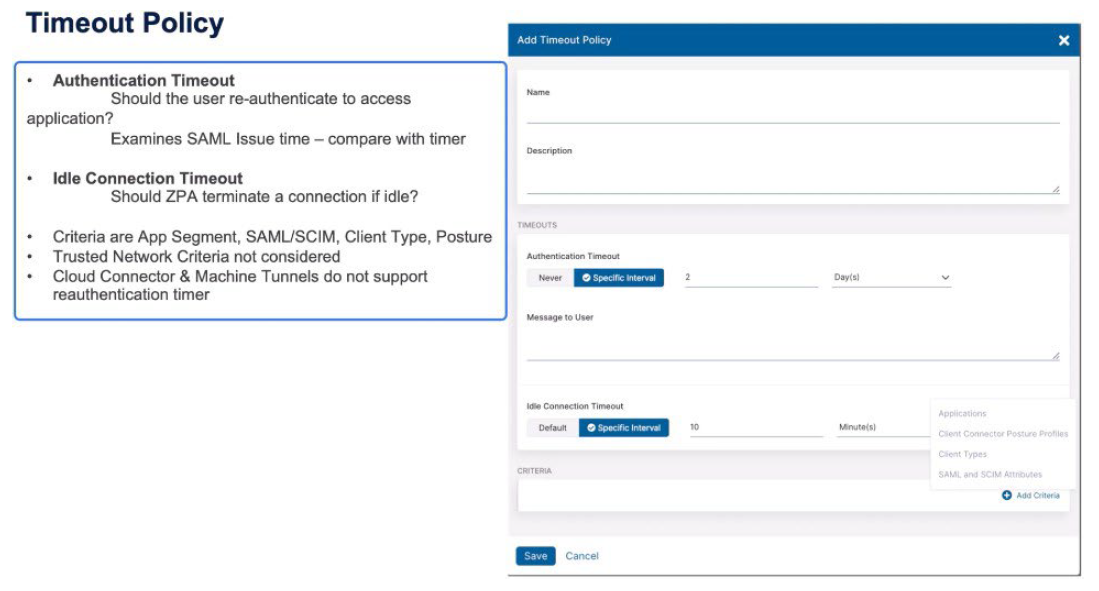
The Timeout policy triggers when the user should reauthenticate. This is based upon business reasons. For certain applications we might want a more frequent authentication interval. The Idle Timeout makes the decision “if we haven't seen any packets for an amount of time for a transaction should we consider it idle and terminate the connection?” The criteria for a Timeout policy are the application names, or the application segments, or segment groups, the Zscaler Client Connector posture profiles, the client types, and then SCIM and SAML attributes.
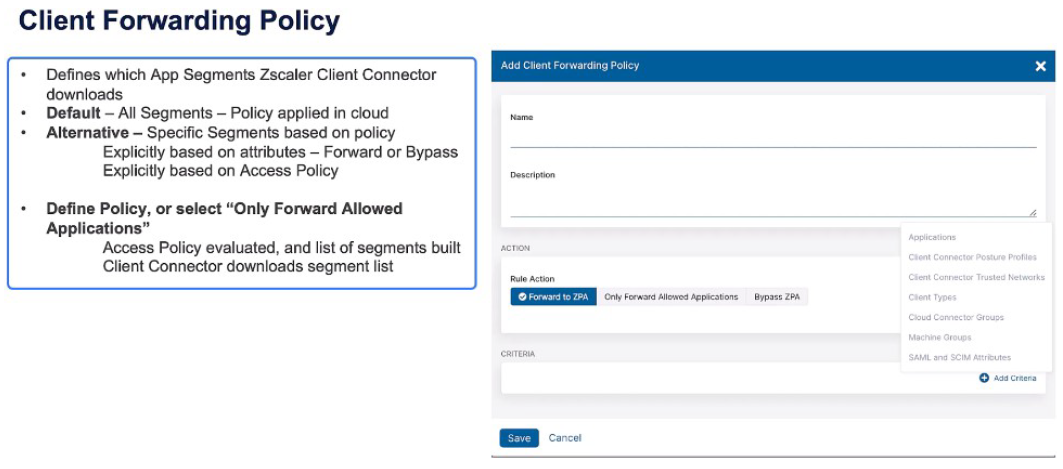
Zscaler Cloud Connector and machine tunnels do not support reauthentication timers so they're excluded as criteria from this rule type. In the Client Forwarding policy, which makes the decisions, should the Zscaler Client Connector download these segments? And then you can make a policy decision based on specific criteria; the applications, the Zscaler Client Connector profiles, the trusted networks, the client types, those machine groups, Zscaler Cloud Connector groups, or the SAML and SCIM attributes, and make explicit rules for either forwarding or bypassing ZPA. Or, you can make the decision simple and say “only forward allowed applications” so the access policy is evaluated and only applications which are allowed access are then downloaded as part of the Client Forwarding policy.
The Inspection policy, again, has the similar criteria type. You can copy criteria access policy rules straight into the Inspection policy, which makes creating policy a lot simpler. It's important to understand that inspection is only for HTTP and HTTPS applications, and also only for those applications that have Inspection enabled for these rules to apply.
The Isolation policy is restricted to client types being the Web Browser. You can then create criteria based on any of the other attributes and you select the isolation profile that's going to be used when the rule triggers for Allow inspection. You then select the isolation profile that's going to be used if the action trigger says, “allow isolation.”
Policy for Zscaler Digital Experience
Zscaler Digital Experience policy determines probe activation based on user attributes like groups, users, locations, and devices or exclusion criteria, such as avoiding probe activation for specific user groups or locations, like in-office scenarios.
Effective digital experience policies optimize probe activation, ensuring efficient monitoring aligned with user contexts, enhancing overall user experience, and improving network performance
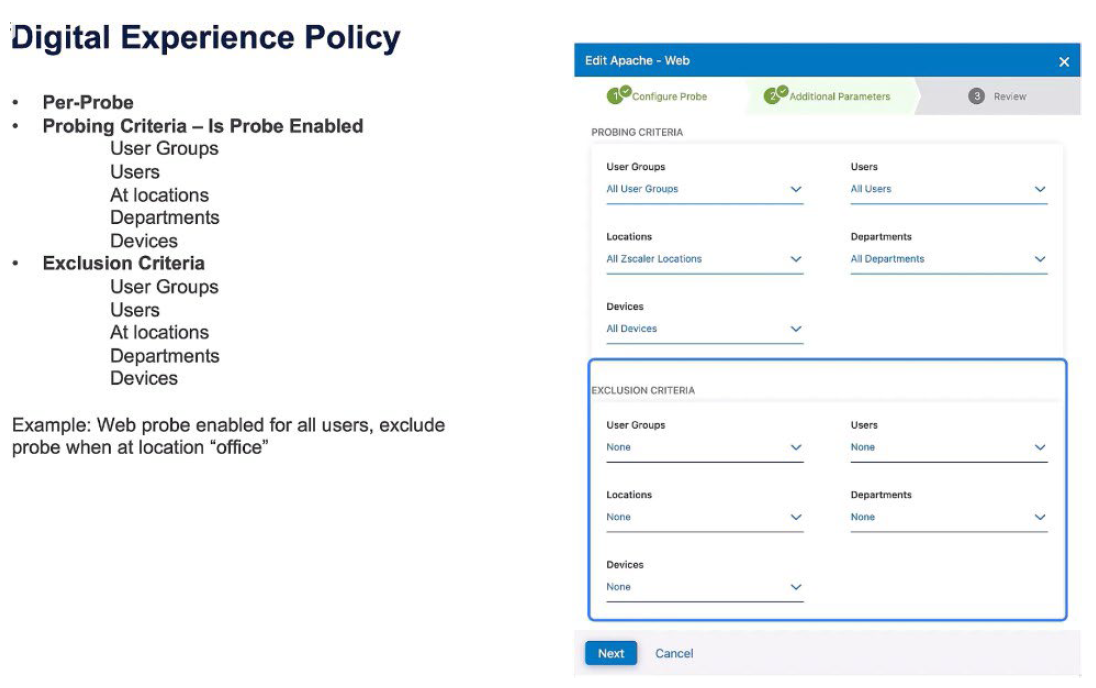
Let's take a look at the policy constructs for Zscaler Digital Experience. The policy constructs are essentially, “should the probe exist for these criteria”? On a per-probe basis, is the probe enabled based on: user groups, specific users, locations, departments, or devices? Or, an exclusion criteria says “this probe will not run on specific user groups, users, locations, departments, or devices”. An example of this: exclude a probe when the user is in the office.
Comment
TABLE OF CONTENTS
RECENT POSTS
- Installing Context-Aware Network Access Control using Cisco ISE Policies
- Designing Network Access Control that is Scalable using Cisco ISE Architecture
- Enterprise Network Access Control and Policy Enforcement using Cisco ISE
- Secure Device Administration and Network Access Using AAA Architecture
- Designing Enterprise-Class Hybrid Cloud Connectivity Using AWS Networking Services
- Exploring Core AWS Networking and Messaging Concepts for Modern Cloud Architectures
- Understanding Key AWS Services for Modern Cloud Architectures
- Building a Strong AWS Foundation with Amazon S3, EC2, and Virtual Private Cloud
- Understanding the ENSDWI Course: Advanced Cisco SD-WAN (Viptela) Concepts
- A Complete Guide to the DCACI-A Course: Mastering Advanced Cisco ACI Concepts


LEAVE A COMMENT
Please login here to comment.